|
INFILTRATION
|
Infiltration is a key
component in the water cycle; it brings water from the surface to the
subsurface. The quantity and quality of the water infiltrating
into the ground is often monitored for flood forecasting, groundwater
recharge calculations, or for contaminant migration. In some
cases the infiltrating water can become contaminated as it flows
through contaminated media, such as landfills and mine tailings.
The creation of this contaminated water can be monitored and predicted
using groundwater models such as Visual HELP, which is used for
landfill design, monitoring and management.
In this newsletter other
properties of infiltration will be discussed, such as:
1. What causes
infiltration?
2. What affects
infiltration?
3. How can
infiltration been quantified?
4. What methods are
available for calculating infiltration?
Back to top of
Newsletter
|
|
1. What
causes infiltration?
Infiltration is caused when a
tension is exerted between the soil particles and the water, this
tension draws
the moisture downwards into the ground through capillary passages.
Back to
Infiltration |
|
2. What
affects infiltration?
Infiltration is affected by
many things. The properties of infiltration vary from soil to
soil, and from one moisture content to another in the same soil. In general,
infiltration is dependent on soil physical properties (such as
porosity and soil type), vegetative cover, soil moisture conditions,
rainfall intensity and the surface slope. For example,
conditions that may encourage high infiltration rates would include
coarse soils, well-vegetated land and low initial soil moisture.
Back to
Infiltration |
|
3. How
can infiltration be quantified?
Infiltration can be
quantified in a variety of ways. For example, the infiltration
capacity of a soil determines how much water the soil can take, the
infiltration rate is how fast the water is infiltrating into the soil,
and the cumulative infiltration is how much water has infiltrated into
the soil up to a point in time. The calculations for the variety of
infiltration parameters vary in complexity from using reported average
rates for soil classes, to the solution of differential equations
governing flow in unsaturated media.
Back to
Infiltration
|
|
4. What
methods are available for calculating infiltration?
As previously mentioned,
there are several methods available for calculating infiltration.
One of the most popular is the Green-Ampt model, developed initially
in 1911. This is an approximate infiltration model based upon
Darcy's Law.
This method requires an iterative process between the infiltration
rate and the cumulative infiltration:

The Green-Ampt model has been
adapted several times since 1911 to fit certain sites and conditions.
There are many more other
types of infiltration models. These include the SCS Runoff Curve
model developed by the Soil Conservation Service (SCS). In this
method, the effects of land use and treatment are taken into account.
This method was empirically developed from studies of small
agricultural watersheds, and was not designed to estimate infiltration
capacity.
Other infiltration models
include the Mein-Larson model, which uses the Green-Ampt formulation,
the Huggins-Monke model, in which time dependencies avoided by
introducing soil moisture as the dependent variable, and several more
including Holtan (1961), Philip (1957) and Morel-Seytoux (1973).
Back to
Infiltration
|
There are many resources
available for more information on infiltration. For this newsletter the following
textbooks were used:
Fetter, C.W. (1988).
Applied Hydrogeology, Third Edition. Published by
Prentice-Hall, Inc., New Jersey, USA.
Freeze, R.A., and J.A. Cherry
(1979). Groundwater. Published by Prentice-Hall,
Inc., New Jersey, USA.
Julien, P.Y. (2002).
River Mechanics. Published by Cambridge University Press.
Cambridge, UK.
Trindall, J.A. and J.R.
Kunkel (1999). Unsaturated Zone Hydrology for Scientists and
Engineers. Published by Prentice-Hall, Inc., New Jersey,
USA.
Viessmann Jr., W. and G.L.
Lewis (1996). Introduction to Hydrology, Fourth Edition.
Published by HarperCollins College Publishers, New York, USA.
Return to top of
Newsletter
|
|
VISUAL
HELP
Click here to download a demo of Visual HELP
Click here for the best price on Visual HELP
Back to top of
Newsletter
|
Visual HELP is a fully
developed modelling environment for evaluating and optimizing
hydrologic landfill design. It is capable of designing
landfills, predicting leachate mounding and evaluating potential
leachate seepage to the groundwater table.
The HELP model (Hydrologic
Evaluation of Landfill Performance) was developed to help hazardous
waste landfill designers and regulators to evaluate the performance of
proposed landfill designs. It was developed by the U.S. Army
Engineer Waterways Experiment Station for the U.S. Environmental
Protection Agency. The original version of HELP was developed in
1984, and many advances in technology and scope have been incorporated
into the code since. Visual HELP provides a user-friendly
interface to this model.
This newsletter will describe
some of the capabilities of Visual HELP, in addition to some of the
new tools and enhancements available in the newest version of the
model.
|
What are some of
the capabilities of
Visual HELP?
1. Easy to Use
2. Project Wizard
3.
Automatic Report Generator
4. Weather Generator
5. Teamwork
What are some of the new tools
and enhancements available?
Return to top of
Newsletter
|
|
|
1. Easy to Use
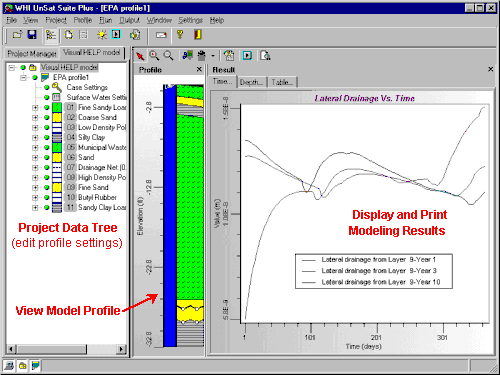
The familiar windows based
design makes Visual HELP easy to use. The program includes three
views: the
Project Tree View, which displays the Visual HELP project you are
working on, the names of each model profile and each layer in the
active model profile; the Profile View, which provides a graphical
representation of the landfill profile; and the output view, which
allows the user to display all of the generated weather and modelling
data. The simultaneous presentation of all three views aid in the ease of use of this model.
Return to
the capabilities of Visual HELP
|
Click here to
enlarge picture
|
|
|
Click here to
enlarge picture
|
2. Project Wizard
Visual
HELP includes a project wizard which provides the user with a
step-by-step wizard to guide them through the process of creating a
model.
Return to the capabilities of Visual HELP
|
|
|
4. Automatic Report
Generator
Visual HELP
also contains an automatic report generator which can quickly produce
a rich text document with tabulated input data, profile graphics and a
display of results.
Return to the capabilities of Visual HELP
|
|
|
Click here to enlarge picture
|
3. Weather Generator
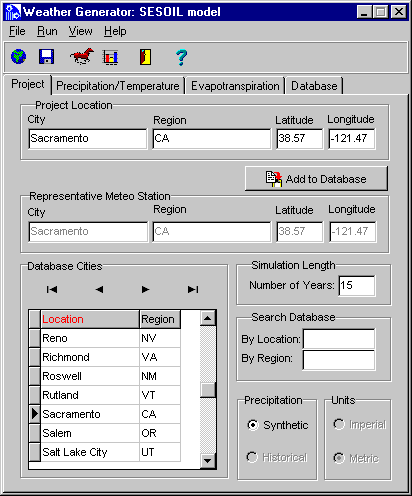
Visual HELP
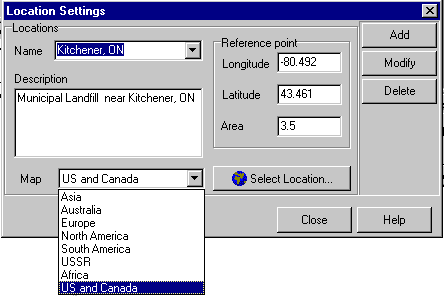
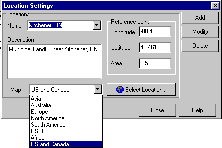
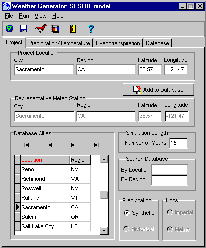
comes equipped with the WHI Weather Generator. This weather
generator is a built in component for generating statistically
reliable weather for almost any location in the world for up to 100
years. This generator uses more than 3000 international weather
stations, and the database is also customizable. The weather
generator uses the weather generation algorithm developed by the
Agricultural Research Service of the U.S. Department of Agriculture.
Return to the capabilities of Visual HELP
|
|
5. Teamwork
Visual HELP
is fully equipped to handle several users working on the same project.
All the project files can be run over a networked system to make
sharing and working in teams much easier.
Return to the capabilities of Visual HELP
|
|
What are some of the new tools
and enhancements available?
The HELP
program is being continuously updated, and thus so is Visual HELP.
Some of the new tools and enhancements available in the most recent
version include:
-
the default
soil material texture list has been expanded to contain additional
waste materials, geomembranes, geosynthetic drainage nets and
compacted soils
-
computations of leachate recirculation and groundwater drainage into
the landfill have been added
-
leakage
through the geomembranes due to manufacturing defects (pinholes) and
installation mishaps (tears and punctures) is accounted for
-
a frozen
soil model has been added to improve infiltration and
evapotranspiration predictions in cold regions.
-
and many,
many more!
Return to the capabilities of Visual HELP
|